 JapanQuest
Before you start
- Publish with the required ad disclosure and confirm the post is public.
- Check the deadline, required links/files, and metric reporting time.
Steps
- 1
Open the correct submission
Open Deliverables from the application or chat and verify the campaign title.
- 2
Add public URLs
Add an HTTPS public URL with a platform label. Up to 10 public links are supported.
- 3
Add deliverable files
Add PDF, image, MP4, or MOV files up to 50 MB each and up to 10 deliverables. Wait for upload completion.
- 4
Review notes and content
Add publication time and context, then open every URL and file before submitting.
- 5
Report performance
Enter requested reach, impressions, likes, saves, shares, comments, or clicks and add up to five evidence images.
- 6
Review Wallet
Track estimated, reviewing, or paid labels and campaign details. Payment is made directly by the company; ask after the agreed date if overdue.
You are done when
URLs, files, and required metrics are visible in the submission for company review.
Checklist
- URLs work while signed out
- Ad disclosure is visible
- Files belong to this campaign
- Metric capture time is recorded
Screen guide
Screens use test data for explanation. Labels may differ by app version and account state.
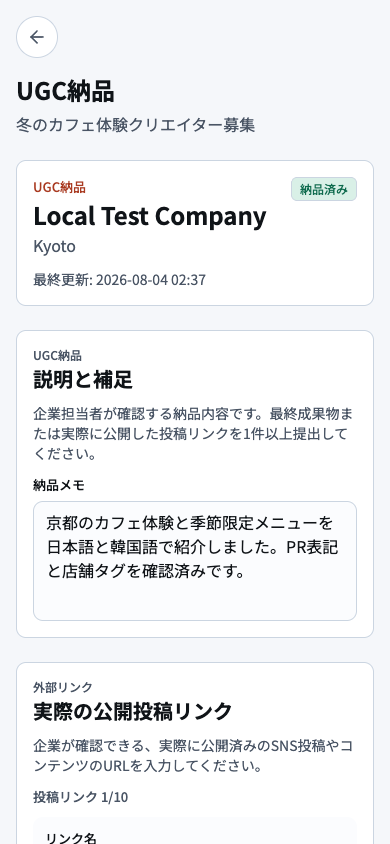
- 1Campaign and submission stateConfirm campaign, due date, and whether the submission is Draft, Saved, or Submitted.
- 2Note to companyAdd only the publication time and information the company needs to review.
- 3Public URL and resultsEnter public URLs and metrics, then test every link in a signed-out browser.
- 4Add files, save, and submitUpload the correct files, wait for completion, review the saved result, and submit once.
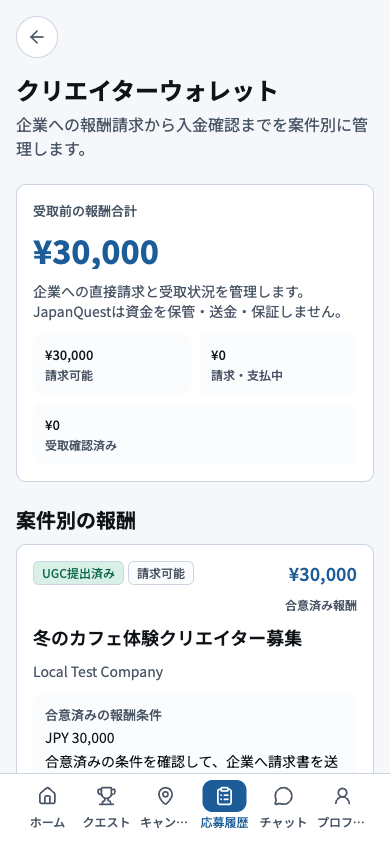
- 1Reward summaryReview expected, pending, and paid compensation totals.
- 2Amounts by stateCompare amounts by state and identify campaigns that have passed the agreed payment date.
- 3Campaign detailMatch each campaign amount with the company and agreed payment date and method.
- 4Ask company or report an issueAsk the company in chat first; if unresolved, report with the application ID and evidence.