 JapanQuest
Before you start
- Update the name, company name, and phone number in your profile.
- Prepare a valid verification document on your device.
Steps
- 1
Open Verification
Open Verification from Settings to see progress and the tasks required for your intended action.
- 2
Verify your phone
Enter the six-digit SMS code sent to the saved number. Never disclose it to support, a company, or another person.
- 3
Submit a document
Companies submit a business verification document (corporations: a certificate of registered matters, 登記事項証明書 / 登記簿謄本; sole proprietors: a copy of the business commencement notice, 開業届, or a business permit); creators submit identity documents. PDF, JPEG, PNG, HEIC, and HEIF files up to 15 MB are supported.
- 4
Connect a social account
Creators connect the social account they will use. If direct connection is unavailable, register the public profile URL manually.
- 5
Follow the status
Follow the displayed ready, pending, approved, or resubmission state. If asked to resubmit, correct only the stated issue.
You are done when
Required verification tasks show as complete and the relevant application or company action is available.
Checklist
- All document corners and text are readable
- Profile and document details match
- The connected profile is public and yours
Screen guide
Screens use test data for explanation. Labels may differ by app version and account state.
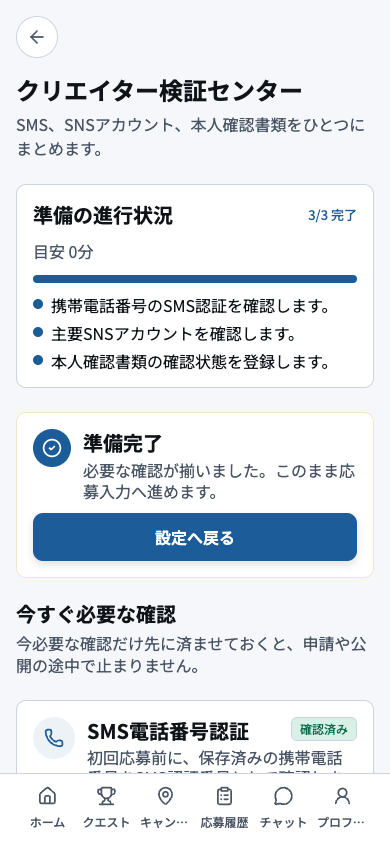
- 1Overall progressUse completed and remaining counts to estimate what must be done before applying.
- 2Application readinessCheck whether applications are currently enabled and which requirement is blocking readiness.
- 3Required checksComplete outstanding phone, identity, profile, and social checks from the top down.
- 4Task actionsOpen each action to submit or correct it, then return and confirm the status changed.
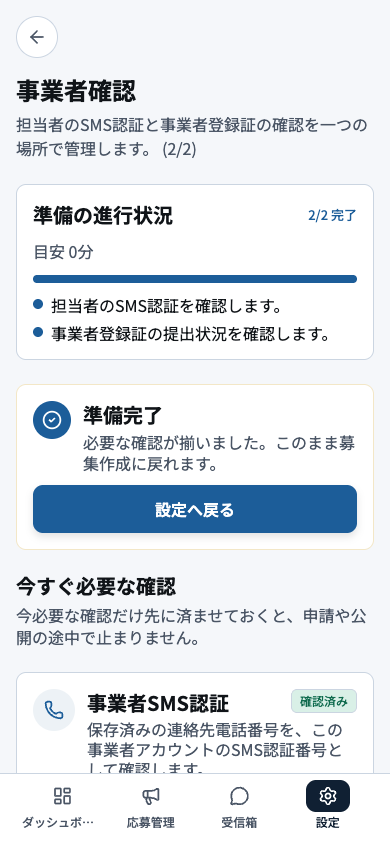
- 1Overall progressReview setup progress and assign any unfinished requirement to the responsible operator.
- 2Operating readinessCheck whether campaign operations are enabled and whether a requirement is blocking publication.
- 3Phone and document tasksOpen phone and business-document tasks and verify names, addresses, and expiry dates match.
- 4Submission and statusSubmit in the requested format and track Pending, Approved, or Resubmission Required.