 JapanQuest
Before you start
- Add your working region and languages to your creator profile.
- Browsing is available first; applying requires the shown verification and social setup.
Steps
- 1
Review Home
See recommendations, application status, wallet summary, and setup tasks. Use the bottom navigation to switch areas.
- 2
Search with Map and filters
Filter by keyword, region, category, and date. Map pins and list cards refer to the same campaigns.
- 3
Read every condition
Check company, venue, benefits, reward, eligibility, capacity, application deadline, result date, schedule, and posting deadline.
- 4
Review the company profile
Open the company profile from campaign details and check business information, branches, languages, and active campaigns. If you open a Home announcement, read its context and destination before continuing.
- 5
Confirm content requirements
Check platform, format, video duration, keywords, hashtags, ad disclosure, and submission method.
- 6
Understand your costs
Review travel, reimbursement, excluded items, companions, tax, and invoicing. Ask before applying if anything is unclear.
You are done when
You can explain the schedule, required work, benefits, compensation, and your own costs for the campaign.
Checklist
- Application and posting deadlines are not confused
- Payment method and date are understood
- The required platform is available
- Travel is safe and feasible
Screen guide
Screens use test data for explanation. Labels may differ by app version and account state.
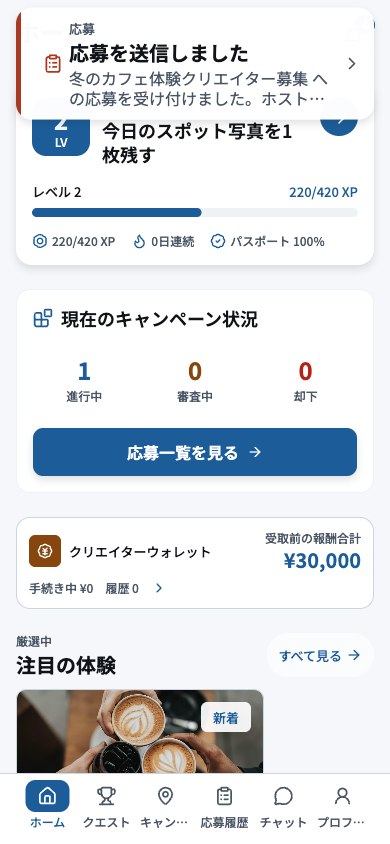
- 1New notificationPrioritize new selection, schedule, chat, and submission-deadline notifications.
- 2Activity and readinessComplete identity, profile, or other readiness items that still block applications.
- 3Application summaryReview active, selected, and submission-due counts and open the next required action.
- 4Wallet and recommendationsReview compensation tracking and recommendations; actual payment comes directly from the company.
- 5Creator navigationMove to discovery, applications, chat, or profile from the creator navigation.
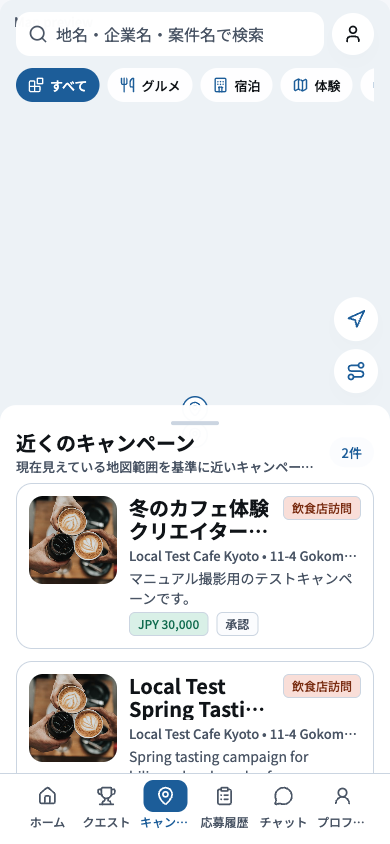
- 1SearchSearch by venue, area, or keyword to narrow the available campaigns.
- 2FiltersApply category, schedule, and eligibility filters, and remember which filters are active.
- 3Map and campaign cardMatch the map pin to its campaign card and check location and travel distance before opening details.
- 4Bottom navigationMove to home, applications, chat, or profile from the primary navigation.
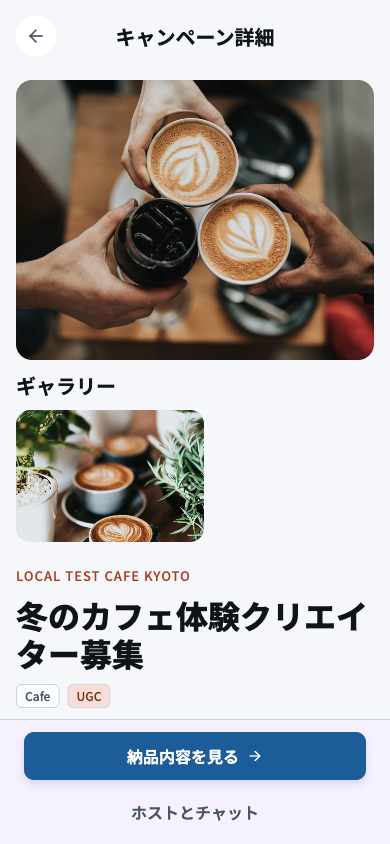
- 1Company, venue, and openingCheck company, venue, recruitment period, and activity date to confirm you can participate.
- 2Benefits and rewardReview the benefits, reward amount, direct-payment method, and agreed payment date.
- 3Eligibility and deliverablesCheck eligibility, required social network, format, ad disclosure, and submission deadline one by one.
- 4Apply actionRead every condition before applying and confirm the campaign is still open and not full.