 JapanQuest
Before you start
- Confirm Accepted or Confirmation requested in Applications.
- Reread the campaign terms and company messages.
Steps
- 1
Recheck the acceptance
Verify campaign, company, reward, benefits, and posting deadline match what you applied to.
- 2
Respond to the schedule
Check date, start/end times, and timezone. Accept or request an adjustment, then verify the confirmed state.
- 3
Keep operating terms in chat
Confirm meeting point, contact, emergency method, filming area, companions, excluded costs, and payment date.
- 4
Attend as registered
The registered creator attends or receives the item at the confirmed time and follows venue and safety rules.
- 5
Report changes early
For delay, illness, or disruption, message the reason and an alternative. Avoid no-shows.
- 6
Recheck before posting
Confirm ad disclosure, prohibited claims, required assets, publishing deadline, and URL submission method.
You are done when
Both sides see the confirmed schedule and can review fulfillment and posting terms in chat.
Checklist
- Schedule is in your calendar
- Filming rules are known
- Changes are recorded
- Ad disclosure is included
Screen guide
Screens use test data for explanation. Labels may differ by app version and account state.
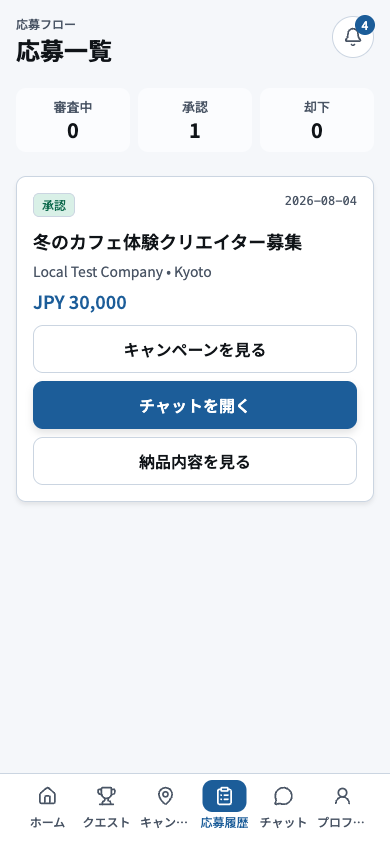
- 1Status filterFilter by Applied, In Review, Selected, or Completed to focus the list.
- 2Application cardVerify campaign, company, date, and current state before opening an application.
- 3Schedule, chat, and deliverable actionsUse the action shown for the current state: schedule response, chat, or deliverable submission.
- 4Bottom navigationBefore leaving, check for unread or time-sensitive actions on the application.
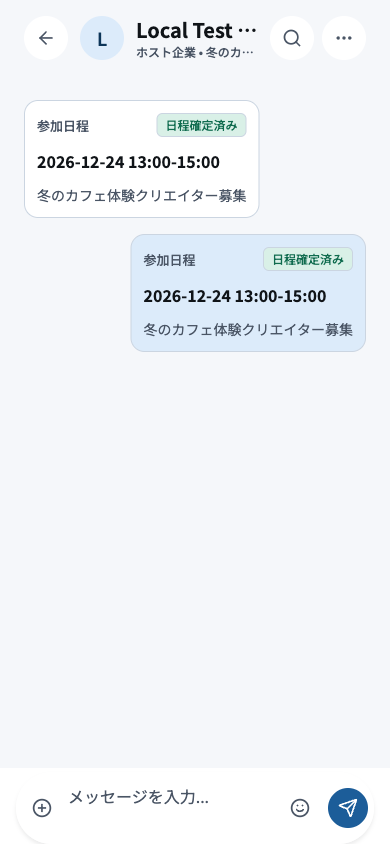
- 1Participant and campaignConfirm the participant and campaign at the top before writing or approving anything.
- 2Schedule proposalReview date, start time, end time, and timezone before accepting or requesting a change.
- 3Agreement messagesRecord venue, benefits, posting deadline, and payment date so both parties retain the agreement.
- 4Compose, attach, and sendAttach only necessary files, review the message, send once, and wait for confirmation.