 JapanQuest
Before you start
- Prepare your display name, bio, location, languages, categories, and primary social profiles.
Steps
- 1
Review the public profile
Make sure image, display name, bio, region, languages, categories, and experience help a company evaluate fit.
- 2
Keep social accounts current
Check connected platforms, public profile URLs, and follower information. Remove or update obsolete connections.
- 3
Use Creator Kit
Review saved assets and quality-checked work. Open the photo, blog, caption, short-video, application, or disclosure starter template, confirm its intended use, and adapt it to your own experience.
- 4
Resolve setup gaps
Use Verification to complete missing phone, identity, profile, and social tasks.
- 5
Complete quests
Read the goal, deadline, mission code, and evidence requirement, then submit the requested URL or image. Images support JPEG/PNG/WebP/HEIC/HEIF up to 12 MB.
- 6
Recheck privacy
Do not expose home address, identity documents, private phone, or unrelated personal data in public profiles, Kit assets, or evidence.
You are done when
Companies can review a current profile and social presence, Creator Kit assets support production, and required application setup is complete.
Checklist
- Image and bio are current
- Social links open
- Kit templates were adapted to the actual experience
- Personal data is minimized
- Quest evidence matches the requirement
Screen guide
Screens use test data for explanation. Labels may differ by app version and account state.
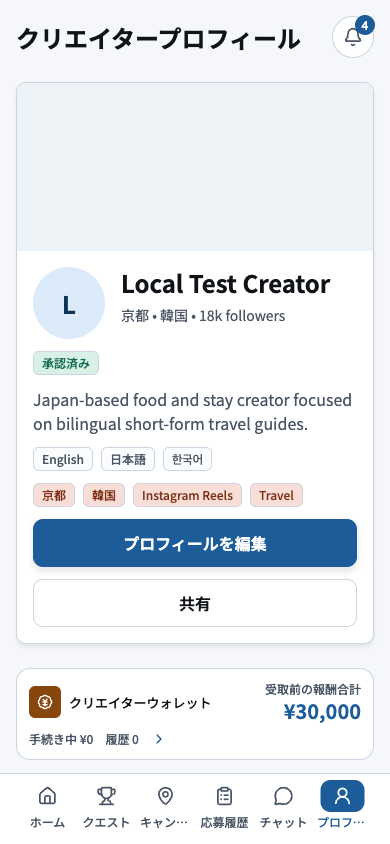
- 1Public profileCheck the photo, display name, bio, location, languages, and categories visible to companies.
- 2Edit and shareEdit or share the profile, then review the public result for layout and content errors.
- 3Experience and walletOpen experience and compensation records, and confirm only appropriate achievements are public.
- 4Settings and verificationOpen social connections, verification, language, and legal settings from here.
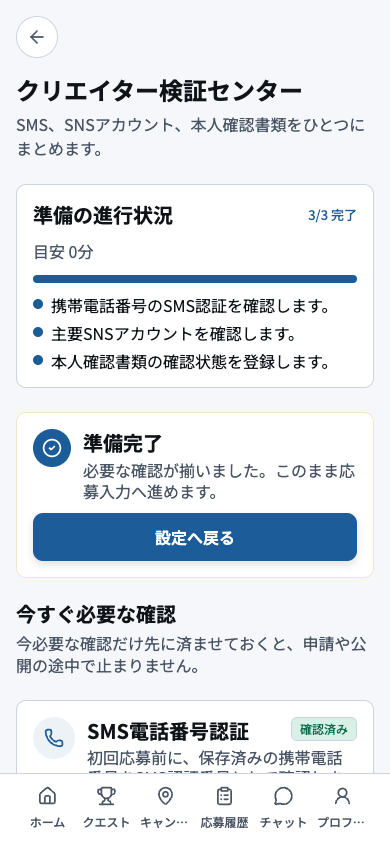
- 1Overall progressUse completed and remaining counts to estimate what must be done before applying.
- 2Application readinessCheck whether applications are currently enabled and which requirement is blocking readiness.
- 3Required checksComplete outstanding phone, identity, profile, and social checks from the top down.
- 4Task actionsOpen each action to submit or correct it, then return and confirm the status changed.
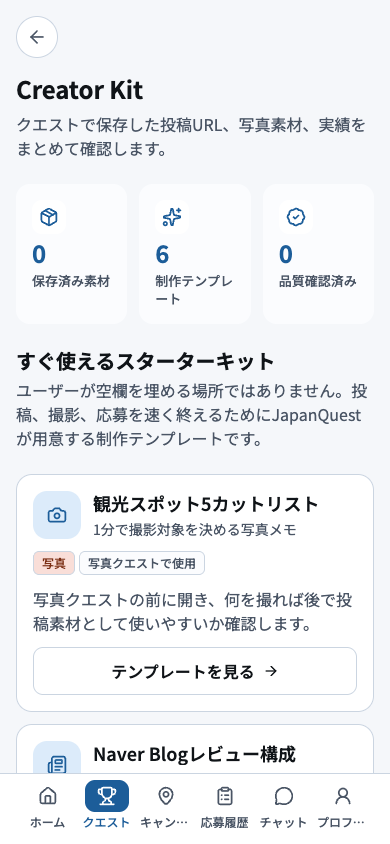
- 1Saved, template, and verified countsReview counts for saved assets, available templates, and quality-checked work.
- 2Ready-to-use starter kitIf starting for the first time, choose only the materials needed from the starter kit.
- 3Templates grouped by useFind a template that matches the intended photo, video, copy, or application task.
- 4Open the template detailsRead its purpose and cautions, then adapt it to the real experience before using it.